


Scheduling HVAC service around business hours means arranging maintenance or repairs at times that cause the least interruption to your daily routine or property operations. Residential tune-ups typically run 60–90 minutes, while commercial visits average 1–2 hours depending on system size. That window is manageable when you plan it right. Providers like Texas Air Repair, EliteHVACS, and Best Heating Cooling all offer evening, weekend, and off-hours appointments specifically designed to protect business continuity. The key is knowing your options before you need them.
How do you schedule HVAC service around business hours?
Flexible HVAC maintenance scheduling is the industry term for what most people simply call “fitting the tech into your day.” The good news is that most reputable providers have built their entire service model around this need.
Evening and weekend appointments are now standard at many providers. Some companies advertise no overtime fees for off-hour work, which removes the financial penalty that used to make after-hours HVAC service feel like a last resort. That shift in pricing policy changes the math completely for property managers running occupied buildings.
Priority scheduling for maintenance contract holders is the second major option. When you hold an annual agreement, you move to the front of the dispatch queue. EliteHVACS, for example, offers emergency response within 2–4 hours for urgent commercial calls, with maintenance customers receiving priority dispatch. That kind of guarantee is worth factoring into your annual budget.
Here is what to look for when comparing providers:
- Evening and weekend availability with no added fees
- Same-day or 2–4 hour emergency dispatch for urgent failures
- Priority scheduling built into maintenance agreements
- Upfront pricing with no hidden charges for off-hours work
- Technicians who confirm arrival windows, not just vague time blocks
Pro Tip: Ask any provider directly: “Do you charge overtime for evening or weekend visits?” If they hesitate or say “it depends,” keep looking. The best companies answer that question in one sentence.
The right provider for flexible HVAC service times is one who treats off-hours scheduling as a standard offering, not a special favor.
How to prepare for an HVAC appointment that fits your schedule
Preparation is what separates a 90-minute visit from a three-hour ordeal. The more information you hand the technician before they arrive, the faster the job goes.
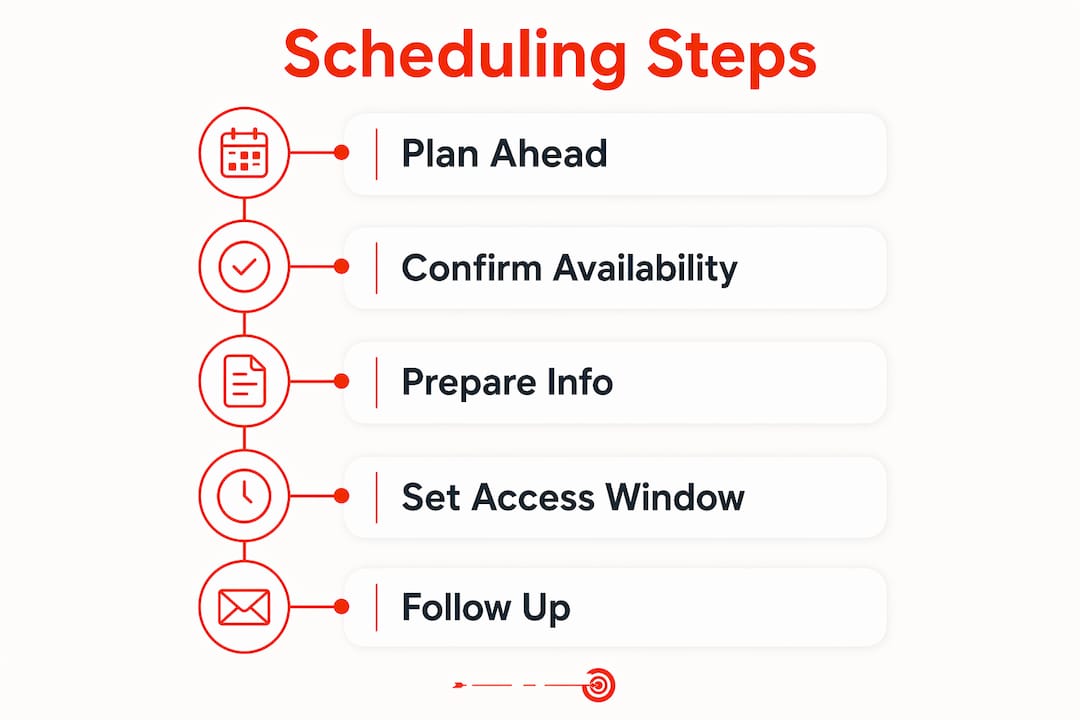
Start scheduling earlier than you think you need to. Generating work orders 8–10 weeks before seasonal windows gives providers time to pre-order parts, route technicians efficiently, and lock in the time slot you actually want. Waiting until the first hot week of summer means you compete with every other property in your zip code for the same limited appointment slots.
Pre-negotiate your access window and build in buffer time. Texas Air Repair specifically recommends building buffer time into confirmed appointment windows to handle unexpected additional work. If you block 90 minutes and the tech finds a secondary issue, that buffer prevents a full-day disruption. For property managers coordinating tenant access, this step is non-negotiable.
Use this preparation checklist before every service visit:
| Preparation Step | Why It Matters |
|---|---|
| Gather system model and serial numbers | Lets the tech arrive with the right parts and filters |
| Document recent issues or unusual noises | Cuts diagnostic time significantly |
| Confirm access routes and key handoff | Prevents delays caused by locked mechanical rooms |
| Clear the area around the unit | Gives the tech immediate access without setup time |
| Note the last service date and work performed | Avoids duplicate checks and focuses the visit |
Timing your seasonal services correctly also matters. Spring is the right window for cooling system prep, and fall is the window for heating. Booking AC maintenance in march or april puts you ahead of the summer rush. Booking furnace maintenance in september keeps you ahead of the first cold snap.
Pro Tip: Keep a one-page system summary for each HVAC unit on your property. Include the model number, filter size, last service date, and any known quirks. Hand it to every technician who walks in. You will cut 15–20 minutes off every visit.
What scheduling strategies actually reduce disruption?
The most effective HVAC maintenance scheduling approach combines condition-based triggers with a computerized maintenance management system, commonly called a CMMS. Calendar-only scheduling is the weakest method available.
Condition-based vs. calendar-based scheduling
Calendar-based scheduling sets a fixed date regardless of equipment condition. It is simple but often wrong. You end up servicing a unit that does not need it yet, or missing a unit that does. Condition-based triggers like runtime hours or differential pressure generate a service task only when the equipment actually needs attention. That means fewer unnecessary visits and better use of your access windows.
| Scheduling Method | Best For | Key Limitation |
|---|---|---|
| Calendar-based | Simple single-unit homes | Ignores actual equipment condition |
| Runtime-hour triggers | Multi-unit properties | Requires monitoring hardware |
| Differential pressure triggers | Filter-heavy commercial systems | Needs sensor installation |
| CMMS-automated scheduling | Property managers with 5+ units | Higher setup cost upfront |
How CMMS tools change the game for property managers
A CMMS reduces missed appointments and administrative time by automating work order creation, technician routing, and follow-up reminders. For a property manager handling 10 or more units across multiple buildings, that automation is the difference between a controlled schedule and a reactive one. Tools like UpKeep, Limble CMMS, and Fiix all offer HVAC-specific workflows that integrate with service provider calendars.
Grouping multi-site visits into a single technician route also cuts total downtime. Instead of four separate visits across four days, one technician handles all four units in a single morning. That approach requires planning 8–10 weeks out, but the payoff in reduced disruption is significant.
How do you handle emergency HVAC calls without losing the day?
A true HVAC emergency is defined by one test: is the system failure creating a health, safety, or revenue risk right now? A broken AC in a server room or a failed furnace during a Massachusetts winter qualifies. A noisy blower or a slightly warm room does not.
Separating genuine emergencies from inconveniences protects you from unnecessary after-hours service premiums. Annual maintenance agreements cost $150–$500 and typically include priority emergency dispatch. That investment pays for itself the first time you need a same-day response and skip the standard queue.
Here is how to build an emergency response plan before you need it:
- Identify your HVAC provider’s 24/7 emergency line and save it in your phone today
- Know which units serve critical spaces like server rooms, medical areas, or occupied units
- Pre-authorize a spending threshold so technicians can proceed without waiting for approval
- Confirm that your service contract covers after-hours labor at no additional fee
- Keep a spare set of access keys or codes with a trusted contact on site
Pro Tip: When negotiating a maintenance contract, ask specifically: “What is covered in an after-hours emergency call, and what is the labor rate if it falls outside the agreement?” Get that answer in writing. Verbal promises disappear when the invoice arrives.
Minimizing business disruption during an emergency also means having a temporary plan. Portable cooling units from companies like MovinCool or Portacool can bridge a gap while waiting for repairs. That option is worth knowing before you are standing in a 90-degree office at 7 a.m.
Key takeaways
Scheduling HVAC service around business hours requires early planning, the right provider agreement, and a clear emergency protocol to avoid disruption and unexpected costs.
| Point | Details |
|---|---|
| Book 8–10 weeks ahead | Early scheduling secures preferred evening or weekend slots before peak season demand. |
| Use maintenance agreements | Annual contracts unlock priority dispatch and often eliminate after-hours labor fees. |
| Build in buffer time | Adding 30–60 minutes beyond the estimated visit length prevents full-day disruptions. |
| Apply condition-based triggers | Runtime or pressure-based scheduling reduces unnecessary visits and fits access windows better. |
| Define emergencies in advance | Pre-set criteria and spending authority cut response time and protect business operations. |
What i’ve learned scheduling HVAC service for busy properties
After years of writing about home systems and property management, the single biggest mistake I see is treating HVAC scheduling as a reactive task. People call when something breaks. They accept whatever time slot is available. Then they wonder why the tech showed up at 2 p.m. on a Tuesday when the building was full.
The property managers who handle this well do one thing differently: they treat HVAC scheduling like a lease renewal. It goes on the calendar months in advance, with a confirmed window, a backup contact, and a written scope of work. That level of preparation sounds like overkill until the first time it saves you a full-day disruption.
I have also seen the buffer time lesson learned the hard way. A 90-minute estimate becomes three hours when the tech finds a refrigerant issue or a failing capacitor. Without buffer time, that discovery turns into a scheduling crisis. With it, it is just a slightly longer morning.
The technology piece is underused by smaller property managers. A CMMS does not require a large portfolio to justify the cost. Even managing three or four units, the automated reminders and service history alone are worth the monthly fee. You stop relying on memory and start relying on data.
The year-round maintenance checklist from Target Air Systems is one of the clearest resources I have seen for homeowners who want to get ahead of this. Use it as your scheduling anchor.
— Warren
Schedule HVAC service on your terms with target air systems
Target Air Systems serves homeowners and property managers across Natick, Canton, Framingham, and surrounding communities with flexible scheduling that fits your life. Their certified technicians offer upfront pricing with no hidden fees, and you do not pay until the job is complete. Whether you need a Canton HVAC service appointment on a Saturday morning or a weekday evening visit, Target Air Systems works around your schedule, not the other way around. Maintenance plans include priority scheduling so you are never stuck waiting when it matters most. Get a quote today and lock in a time that actually works for you.
FAQ
Can i schedule HVAC service for evenings or weekends?
Most reputable HVAC providers offer evening and weekend appointments, and many advertise no overtime fees for off-hours work. Confirm this policy before booking to avoid surprise charges on your invoice.
How long does a typical HVAC service visit take?
Residential tune-ups typically run 60–90 minutes, while commercial maintenance visits average 1–2 hours depending on system size. Build buffer time into your schedule to account for any additional work discovered on site.
What is the best time of year to schedule HVAC maintenance?
Spring is the right window for cooling system service, and fall is the window for heating system prep. Booking 8–10 weeks before peak season secures your preferred time slot and avoids the summer and winter rush.
Does a maintenance agreement help with flexible scheduling?
Yes. Annual maintenance agreements typically include priority dispatch and often cover after-hours labor at no extra charge. They cost $150–$500 per year and reduce both emergency costs and scheduling friction.
What counts as a true HVAC emergency?
A true emergency involves a system failure that creates an immediate health, safety, or revenue risk, such as no heat during freezing temperatures or a failed AC in a critical space. Non-urgent issues like minor noise or slight inefficiency can wait for a standard scheduled visit.